KMS vs Secrets Manager: How Key Management and Secrets Management Differ
When GitGuardian analyzed thousands of compromised developer machines, on average, each live secret turned up in eight different places, from .env files and shell history to IDE settings and build artifacts.
Credentials spread to wherever developers and their tools need them, and the two systems built to contain that spread, a key management service (KMS) and a secrets manager, get mixed up constantly because they both protect sensitive values.
KMS vs Secrets Manager: The Short Answer
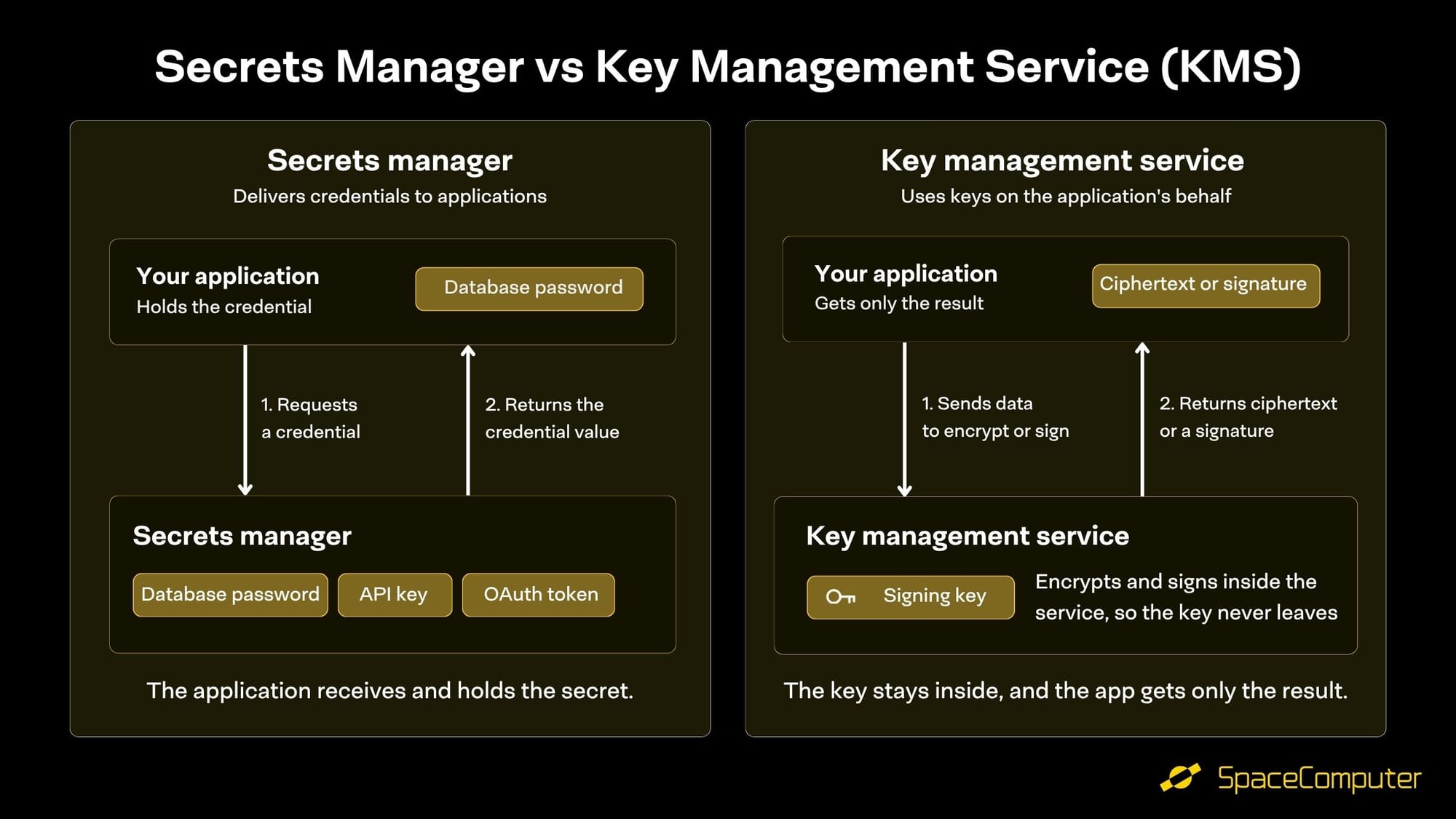
A secrets manager stores credentials such as API keys, database passwords, and access tokens, and delivers them to applications when they need to authenticate. A key management service (KMS) stores cryptographic keys and performs encryption, decryption, and signing on an application's behalf, so the application never receives the key. The difference comes down to whether the application ever holds the value.
A Secrets Manager Delivers Credentials to Applications
A secret is any value an application presents to prove it's allowed in: the password for a database, the key for a payments API, or the token for a cloud account. Without a secrets manager, those values end up hardcoded in source code or copied into config files on every server that needs them.
A secrets manager replaces those copies with a single protected store. Applications request a secret at runtime, access policies decide who can read which values, and every read is logged. Most secrets managers also rotate credentials, replacing a database password on a schedule and updating the applications that use it. Common examples include AWS Secrets Manager and the key/value store in HashiCorp Vault.
The need has grown with automation. Machine identities now outnumber human identities by more than 80 to 1, according to CyberArk's 2025 Identity Security Landscape, and each service account, CI/CD pipeline, and integration among them needs credentials of its own.
A Key Management Service Uses Keys Without Handing Them Out
A KMS protects a different kind of value: the cryptographic keys that encrypt data and produce digital signatures. Applications send the KMS a request, such as "encrypt this record" or "sign this transaction," and get back the result while the key stays inside the service. HashiCorp describes Vault's transit engine, its key management feature, as encryption as a service, since Vault performs the operation and doesn't store the data it encrypts.
The two tools behave differently because the values work differently. An API key only works when an application presents it to another service, so it has to be delivered. An encryption key does its job wherever the cryptographic operation runs, so it can stay inside the KMS, where an attacker who's broken into a server can use it while they're inside but can't walk away with a copy.
Every Secrets Manager Relies on a KMS
A secrets manager has to encrypt the secrets it stores, and that encryption depends on a key held somewhere safer than the secrets themselves. In most setups, that key lives in a KMS. AWS Secrets Manager, for example, encrypts every secret with a key from AWS KMS. Choosing between the two isn't usually an either/or decision, because the KMS protects the keys that protect your secrets.
KMS vs Secrets Manager Comparison
When to Use a KMS, a Secrets Manager, or Both
- Database passwords and third-party API keys belong in a secrets manager, since the application has to present them to another system.
- Encrypting customer records, backups, and files belongs in a KMS, since the key never needs to leave.
- Signing software releases or blockchain transactions belongs in a KMS, since a signing key that leaves its protected boundary can be used to impersonate you.
- Most production systems use both, with the KMS protecting the secrets manager's own encryption keys.
The most common mistake is storing an encryption key in a secrets manager. It's a habit that turns a key that never needed to leave its vault into a value every authorized application can read, copy, and leak.
AI Agents Blur the Line Between Secrets and Keys
AI agents make this decision harder. An agent that calls APIs needs credentials delivered to it, but anything that sits in an agent's context, configuration, or logs can leak through a prompt injection or a careless config file. GitGuardian found 24,008 unique secrets exposed in MCP configuration files, the files that connect AI models to external tools. IBM's 2026 Cost of a Data Breach Report found that 92% of organizations reporting an AI-related breach lacked proper access controls for AI models and data.
The answer combines both models: agents receive short-lived, scoped credentials that are protected by a KMS, so they can complete a task without ever holding a plaintext secret they could reuse or expose later.
SpaceComputer's Key Management Service Covers Both
Our Key Management Service public beta is live now, and it covers both sides of this comparison. Developers can store, retrieve, list, and delete secrets through our API, alongside encryption (transit) operations and Ethereum signing, with keys that are non-exportable by design.
Key operations run inside hardware-isolated environments, either Intel TDX trusted execution environments (TEEs) or a hardware security module (HSM), as our CTO Filip Rezabek lays out in Secure Key Management Services Beyond the Cloud.
For teams building with AI agents, an orchestrator agent can hand worker agents time-limited, wrapped secrets within a single account, so workers finish their tasks without ever holding the plaintext credential. Beta testers get 500 KMS credits, free for the duration of the beta.
Create an account at accounts.spacecomputer.io to start building.
Frequently Asked Questions
Is HashiCorp Vault a KMS or a secrets manager?
It's both. Vault's key/value engine stores and delivers secrets like a secrets manager, while its transit engine performs encryption and signing without releasing keys, which is how a KMS works.
Should I store encryption keys in a secrets manager?
Generally not. A secrets manager is designed to hand values out, so an encryption key stored there becomes readable by every application with access, while a KMS keeps the key inside and returns only the result of each operation.
Is an API key a cryptographic key?
Most API keys are credentials rather than encryption keys: they identify and authorize the caller, so they belong in a secrets manager. The keys a KMS manages are the ones used to encrypt, decrypt, and sign data.
Do I need both a KMS and a secrets manager?
Most production systems do. The secrets manager delivers credentials to applications, and the KMS protects the encryption keys underneath it, along with any data encryption and signing your applications perform.
SpaceComputer is the open, credibly neutral infrastructure layer that connects the space economy, providing the hardware and software standard for verifiable compute and cybersecurity across operators, jurisdictions, and satellites, with high security guarantees and verifiability.
Visit our website to learn more about our Key Management Service.
Follow us on X (Twitter) and LinkedIn.